Text to Speech Converter

Convert text into natural-sounding speech instantly. Listen to articles, documents, and notes for free.

How It Works

Convert text to audio in 3 steps

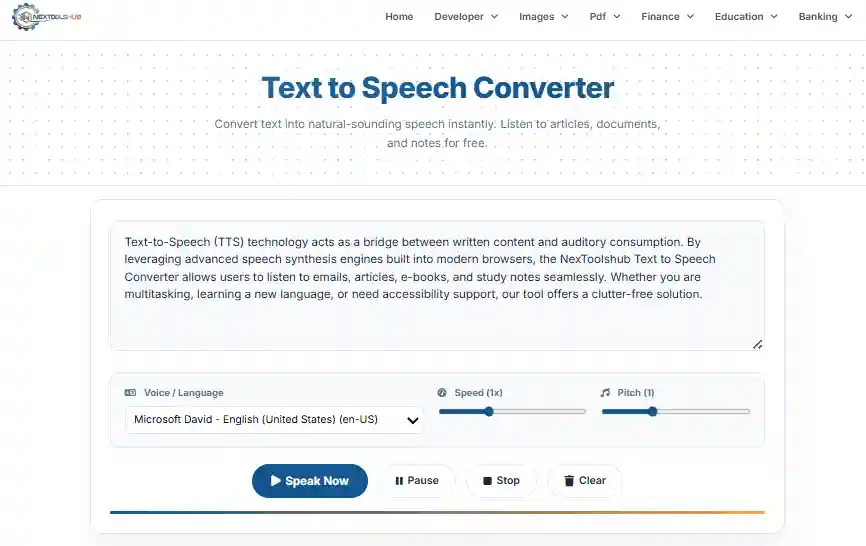
1. Enter Text

Type or paste the content you want to hear.

2. Customize

Select your preferred voice, speed, and pitch.

3. Listen

Click 'Speak Now' and enjoy the audio.

Transforming Text into Lifelike Speech

Text-to-Speech (TTS) technology acts as a bridge between written content and auditory consumption. By leveraging advanced speech synthesis engines built into modern browsers, the NexToolshub Text to Speech Converter allows users to listen to emails, articles, e-books, and study notes seamlessly. Whether you are multitasking, learning a new language, or need accessibility support, our tool offers a clutter-free solution.
Text to Speech Waveform
Key Benefits
  • Accessibility: Empowering users with visual impairments or reading difficulties like dyslexia.
  • Productivity: Consume content while commuting, exercising, or cooking.
  • Language Learning: Improve pronunciation by listening to native voice engines.

Understanding TTS Technology

Our converter utilizes the Web Speech API. Unlike server-based TTS systems that require uploading files and waiting for processing, this tool runs entirely on your device (Client-Side). This ensures two things:
1. Speed: Instant conversion without buffering.
2. Privacy: Your text never leaves your browser; it is processed locally by your operating system's voice engine.

Frequently Asked Questions

Yes, NexToolshub provides this Text-to-Speech tool 100% free with no character limits.

Direct download isn't supported due to browser restrictions. You can use a screen recorder to capture the system audio.

The voices are provided by your operating system (Windows, macOS, Android, iOS). Different devices have different voice packs installed.

We don't impose a limit, but browsers may pause on extremely long texts (10k+ words). It's better to process in chunks.

Voices belong to Microsoft/Google/Apple. Check their specific license for commercial use. Personal use is generally fine.

Yes! Check the dropdown. If your device has Spanish, French, or Hindi language packs, they will appear.

Absolutely. Processing happens locally on your device. We do not store or read your text.

Check your volume. Also, ensure you selected a voice from the dropdown. Refreshing the page often fixes glitches.

Yes, use the 'Speed' slider. 1x is normal, 2x is fast, 0.5x is slow.

Yes, it works flawlessly on iOS and Android, utilizing their high-quality native mobile voices.